MySQL为什么会选错索引:优化器索引选择机制

ALT: MySQL query optimizer index selection mechanism explaining why wrong indexes are chosen in production systems
Why MySQL Picks the Wrong Index: Understanding the Optimizer’s Index Selection Mechanism
Key Conclusion: MySQL’s query optimizer uses a cost-based model to select execution plans, but its estimates of row counts, index cardinality, and I/O costs can be inaccurate — leading to suboptimal or outright wrong index choices. Understanding how the optimizer evaluates indexes, what statistics it relies on, and how to intervene when it goes wrong is essential knowledge for any backend engineer optimizing production MySQL systems.
This is one of the most frustrating experiences in production MySQL work: you’ve carefully built an index, confirmed with EXPLAIN that it should be used, but at runtime MySQL stubbornly chooses a full table scan or a less selective index. The query is slow, users are complaining, and the fix isn’t obvious.
The root cause almost always lies in how MySQL’s query optimizer works internally — specifically how it estimates query cost, how it maintains index statistics, and what heuristics guide its decisions. Once you understand the mechanism, the behavior becomes predictable, and the fixes become clear.
Who Should Read This Article
✅ Applicable Scenarios:
- Backend engineers experiencing unexpectedly slow queries despite having relevant indexes in place
- Developers preparing for senior engineering interviews where MySQL internals and query optimization are tested
- Engineers responsible for production database performance tuning, query plan analysis, and schema design
❌ Not Applicable/Cautions:
- Developers who have not yet established basic familiarity with MySQL index types and the
EXPLAINcommand — start there first - Teams using MySQL 5.5 or earlier, as some optimizer behaviors and statistics mechanisms differ significantly from 5.6+ and 8.0
The Problem Background: Why Index Selection Goes Wrong
To understand wrong index selection, you first need to understand what the optimizer is actually trying to do.
MySQL uses a cost-based optimizer (CBO). When you submit a query, the optimizer doesn’t simply pick the most obvious index — it evaluates multiple possible execution plans, estimates the cost of each (primarily in terms of disk I/O and row reads), and selects the plan with the lowest estimated cost.
The critical word here is estimated. The optimizer doesn’t execute each plan to see which is fastest. It relies on index statistics — specifically, a metric called cardinality — to approximate how many rows each plan would scan. If those statistics are stale, inaccurate, or misleading, the optimizer’s cost estimates go wrong, and it selects a suboptimal plan.
This is not a bug. It’s a fundamental characteristic of cost-based optimization. The same design exists in PostgreSQL, Oracle, and SQL Server. But MySQL’s statistics sampling mechanism, InnoDB’s buffer pool dynamics, and certain optimizer heuristics make wrong index selection more common in practice than many engineers expect.
There are three primary root causes worth examining in depth:
Inaccurate cardinality estimates caused by stale or sampled statistics, especially after large data changes. Misleading cost models where the optimizer underestimates the cost of a full table scan when the table is largely cached in the InnoDB buffer pool. And optimizer heuristics that override pure cost calculation in edge cases, sometimes counterproductively.
Understanding each of these requires going inside the optimizer — which is precisely what MySql实战45讲 covers systematically across its 45-lesson curriculum, complete with hand-drawn diagrams illustrating exactly how these decisions are made at the engine level.
Deep Dive: How MySQL’s Optimizer Actually Selects Indexes
Three Steps to Diagnosing a Wrong Index Selection
Step 1: Run EXPLAIN and Identify the Chosen Plan
Start by running EXPLAIN SELECT ... on the slow query. Look at the key column (which index was used), the rows column (estimated row count), and the type column (access method: ALL means full scan, ref or range are index-based). This gives you the optimizer’s chosen plan and its estimated row count — which is often where the inaccuracy lives.
Step 2: Check Index Statistics with SHOW INDEX
Run SHOW INDEX FROM your_table and examine the Cardinality column. Cardinality represents the estimated number of distinct values in an index column. If cardinality is drastically off compared to reality (e.g., it shows 1000 but the actual distinct count is 500,000), the optimizer is working from bad data. You can also run ANALYZE TABLE your_table to trigger a statistics refresh and then re-run EXPLAIN to see if the plan changes.
Step 3: Use FORCE INDEX to Validate and Intervene
If you suspect the optimizer is choosing the wrong index, use FORCE INDEX (index_name) in your query to manually direct it to the correct index, then compare execution times. This is diagnostic first, not a permanent fix — but it confirms whether the problem is optimizer selection versus something deeper like missing indexes or query structure issues.
Comparing Index Selection Intervention Strategies
When the optimizer consistently picks the wrong index, you have several intervention options. Each carries different trade-offs in terms of maintenance overhead, performance stability, and coupling to schema details.
| Comparison Dimension | FORCE INDEX Hint | ANALYZE TABLE | Optimizer Hints (8.0+) |
|---|---|---|---|
| Implementation Effort | Low — add directly to query | Low — one-time command | Medium — requires hint syntax knowledge |
| Persistence | Must be in every query | Temporary (stats decay) | Per-query, must be maintained |
| Risk of Breaking on Schema Change | High — breaks if index renamed/dropped | None | Medium — depends on hint specifics |
| MySQL Version Support | All versions | All versions | MySQL 8.0+ |
| Recommended Use Case | Temporary debugging | Stale statistics fix | Long-term production tuning |
The most durable fix is usually improving statistics accuracy, followed by careful query rewrites. Index hints should generally be a last resort for production code due to maintenance fragility.
How Cardinality Estimation Works — and Where It Fails
Cardinality is at the heart of index selection. InnoDB estimates cardinality by sampling a subset of index pages — not by scanning the entire index. The number of pages sampled is controlled by the innodb_stats_persistent_sample_pages variable. A higher sample count gives more accurate estimates at the cost of more I/O during statistics collection.
When the sample happens to hit pages that are not representative of the full data distribution — which is common after large bulk inserts, deletions, or updates — the resulting cardinality estimate can be wildly off. The optimizer then uses this bad estimate to compare index access cost versus full scan cost, and can make the wrong choice.
Consider a concrete example. Suppose you have a table with 10 million rows and an index on a status column with values active and inactive. The actual distribution is 9.9 million active and 100,000 inactive. If you query WHERE status = 'inactive', the optimizer should use the index — only 1% of rows match. But if the statistics were collected right after a data migration that temporarily skewed the distribution, the optimizer might estimate much higher selectivity and choose a full scan instead.
This is a real, recurring problem in production systems with frequent data changes, and it’s one of the scenarios explored in depth in MySql实战45讲.
The Buffer Pool Complication
MySQL’s cost model also accounts for the InnoDB buffer pool. When pages are already cached in memory, the cost of reading them is much lower than cold disk reads. In theory, this should improve cost estimates. In practice, it can cause the optimizer to underestimate the cost of a full table scan on a warm, frequently accessed table — especially for smaller tables that fit largely in memory.
The optimizer might reason: “A full scan of this 500MB table is cheap because most of it is in the buffer pool.” But the full scan still reads every page and processes every row, while an index read would skip 99% of them. This heuristic doesn’t always serve queries well.
Index Merges and Multi-Index Confusion
Another source of wrong selection involves index merge operations. MySQL can theoretically combine results from multiple indexes using intersection or union operations. But the optimizer’s cost estimation for index merges is notoriously imprecise. Engineers often find that a properly designed composite index dramatically outperforms what the optimizer thought would be an efficient index merge — and yet the optimizer keeps choosing the merge. Disabling index merge with SET optimizer_switch = 'index_merge=off' and comparing performance is a useful diagnostic step in these cases.
Using Optimizer Trace for Full Visibility
In MySQL 5.6+, you can enable the optimizer trace to see the full decision-making process:
SET optimizer_trace = “enabled=on”;
SELECT …your query…;
SELECT * FROM information_schema.OPTIMIZER_TRACE;
SET optimizer_trace = “enabled=off”;
The trace output shows every candidate plan, estimated costs, and why each was accepted or rejected. It’s verbose, but it’s the most authoritative source of truth about what the optimizer was actually thinking. For engineers doing serious production tuning, reading optimizer traces is an indispensable skill.
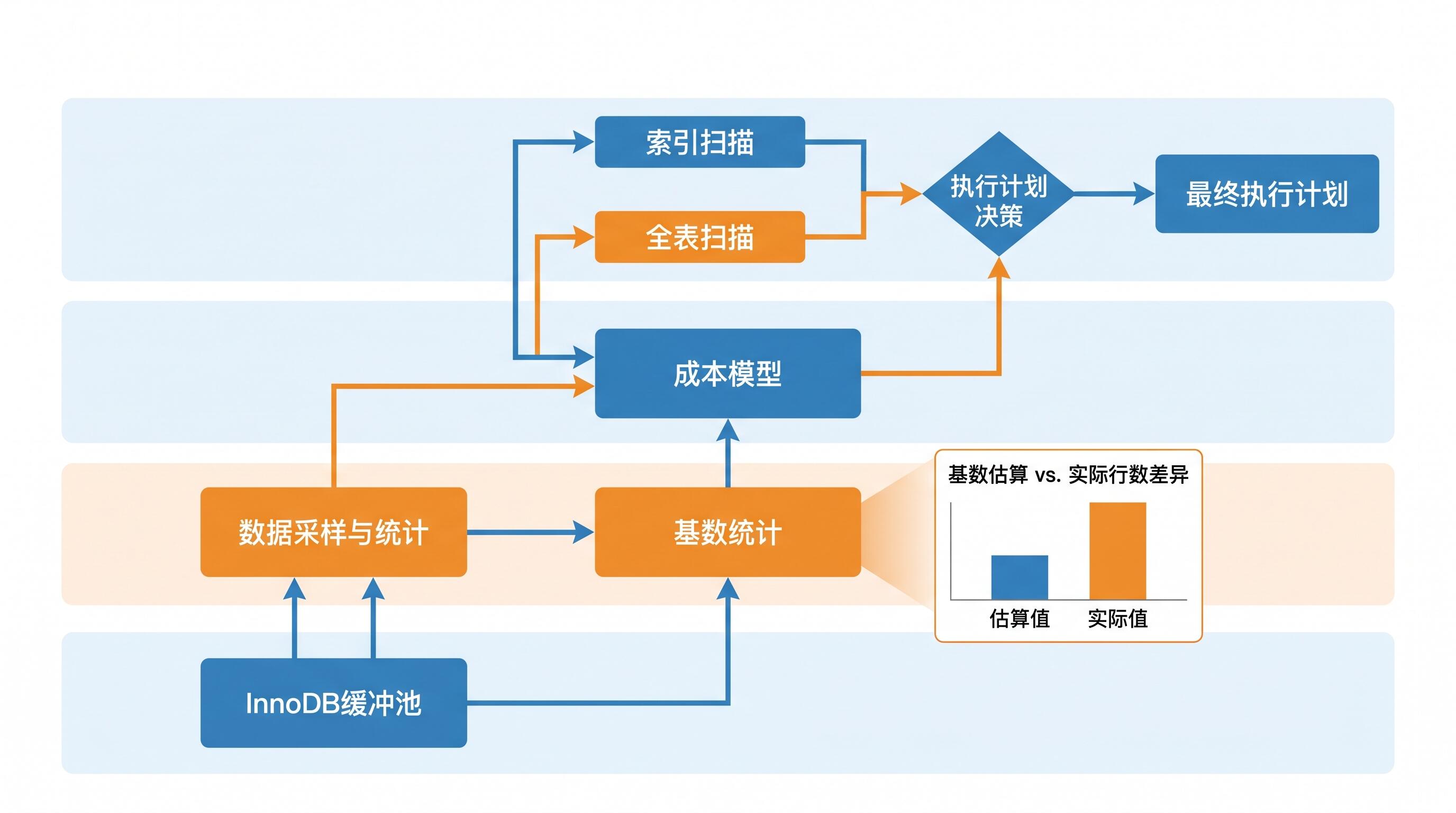
ALT: Diagram showing MySQL optimizer cost-based index selection process using cardinality statistics and InnoDB buffer pool estimates
Advanced Considerations: Edge Cases and Common Misconceptions
Misconception: Adding More Indexes Improves the Optimizer’s Choices
A common reflex is to add more indexes when queries are slow. But too many indexes can actually worsen optimizer behavior. With many candidate indexes, the optimizer has more plans to evaluate, more statistics to maintain, and greater opportunity for estimation errors. Focus on high-selectivity, well-designed composite indexes rather than proliferating single-column indexes.
Special Case: ORDER BY and Index Selection
When a query includes ORDER BY, the optimizer faces an additional trade-off: use an index that avoids a filesort (even if it’s less selective for the WHERE condition), or use a more selective index but pay the cost of sorting. This conflict frequently causes the optimizer to choose an index that seems wrong from a filtering perspective but avoids an expensive sort. Understanding this trade-off is key to diagnosing slow queries that involve both filtering and sorting.
Special Case: Low-Cardinality Indexes
For columns with very few distinct values (boolean flags, status codes with only a handful of states), B-tree indexes often provide little benefit and can confuse the optimizer. In some cases, the optimizer correctly skips the index; in others, it uses it unnecessarily. For truly low-cardinality columns, consider whether the index is warranted at all, or whether query rewriting or partitioning might be more effective.
Relationship with Statistics Persistence
MySQL 5.6 introduced persistent statistics (stored in mysql.innodb_table_stats and mysql.innodb_index_stats), which survive server restarts. Before this, statistics were recalculated on restart, causing plan instability. Persistent statistics improved stability but also mean that stale stats persist longer. In high-churn tables, setting innodb_stats_auto_recalc = ON and tuning innodb_stats_persistent_sample_pages appropriately is important for keeping the optimizer well-informed.
Frequently Asked Questions FAQ
Q1: How do I force MySQL to use a specific index in production queries?
You can use the FORCE INDEX (index_name) syntax immediately after the table name in your query: SELECT * FROM orders FORCE INDEX (idx_created_at) WHERE .... This tells the optimizer to use only that index for table access. Use this sparingly in production — it creates tight coupling between your query and index names. If the index is renamed or dropped, the query fails. It’s most useful as a temporary measure while you address the underlying statistics or schema issue.
Q2: Is running ANALYZE TABLE safe on a production MySQL database?
In MySQL 5.6+ with InnoDB, ANALYZE TABLE uses online statistics collection and does not lock the table for reads or writes. It’s generally safe for production use. However, on very large tables it can generate I/O pressure as it samples index pages. It’s best scheduled during low-traffic periods or executed with monitoring in place. After running ANALYZE TABLE, always re-run EXPLAIN on affected queries to verify that the optimizer’s plan has improved.
Q3: How often should index statistics be refreshed to prevent wrong index selection?
There’s no universal answer — it depends on your table’s data change rate. InnoDB automatically recalculates statistics when roughly 10% of a table’s rows change (controlled by innodb_stats_auto_recalc). For high-churn tables, this may still not be frequent enough. For critical tables with known stability issues, some teams schedule ANALYZE TABLE to run periodically during maintenance windows. Monitoring query execution plans over time and alerting on plan changes is a more robust long-term strategy than relying on automatic recalculation alone.
Summary
MySQL’s index selection mechanism is not magic — it’s a cost-based estimation process with real limitations. Three insights stand out as most actionable for backend engineers:
First, wrong index selection is almost always rooted in inaccurate statistics. Stale cardinality estimates cause the optimizer to compare plans using bad data. ANALYZE TABLE and properly tuned statistics sampling are your first line of defense.
Second, the optimizer’s cost model has known blind spots — particularly around buffer pool warmth and index merge operations. Understanding these allows you to anticipate where the optimizer will fail and design schemas and queries that guide it toward correct choices.
Third, EXPLAIN, optimizer traces, and FORCE INDEX are not just debugging tools — they’re the vocabulary of deep MySQL understanding. Engineers who read execution plans fluently can diagnose and resolve optimizer issues that appear mysterious to those operating at the surface level.
The next step is to take these principles into a live system. Pick a slow query, run EXPLAIN, check cardinality with SHOW INDEX, try ANALYZE TABLE, and observe how the optimizer’s plan changes. Pair this hands-on exploration with systematic study of MySQL internals.
Call to Action
Ready to move from “knowing how to use MySQL” to truly understanding how it works under the hood? MySql实战45讲, led by former Tencent Cloud and Alibaba database architect Lin Xiaobin, gives you 45 structured lessons packed with 100+ hand-drawn diagrams and real-world cases covering transactions, indexes, locks, and beyond. Start your deep-dive journey today at https://jums.gitbook.io/mysql-shi-zhan-45-jiang and build the MySQL expertise that sets senior engineers apart.
References
- MySQL Documentation. “Understanding the Query Execution Plan”.
https://dev.mysql.com/doc/refman/8.0/en/execution-plan-information.html - MySQL Documentation. “InnoDB Persistent Statistics”.
https://dev.mysql.com/doc/refman/8.0/en/innodb-persistent-stats.html - MySQL Documentation. “Optimizer Hints”.
https://dev.mysql.com/doc/refman/8.0/en/optimizer-hints.html - Percona. “Understanding MySQL EXPLAIN Output”.
https://www.percona.com/blog/understanding-mysql-explain-output/ - MySQL Documentation. “ANALYZE TABLE Statement”.
https://dev.mysql.com/doc/refman/8.0/en/analyze-table.html
Note: Standards may be updated, please check the latest official documents or consult professional advisors.
About MySql实战45讲
MySql实战45讲 is a premium 45-lecture MySQL deep-dive course series created by Lin Xiaobin (Ding Qi), former database lead at Tencent Cloud and Alibaba, designed to help developers systematically master MySQL core principles — including transactions, indexing, and locking — through 100+ hand-drawn diagrams and practical engineering cases. Learn more at https://jums.gitbook.io/mysql-shi-zhan-45-jiang.
© MySql实战45讲. All rights reserved. This article is intended for educational and informational purposes only. All technical content is based on the original course material. Reproduction or redistribution without permission is prohibited.
About MySql实战45讲
MySql实战45讲 is a premium 45-lecture MySQL deep-dive course series created by Lin Xiaobin (Ding Qi), former database lead at Tencent Cloud and Alibaba, designed to help developers systematically master MySQL core principles — including transactions, indexing, and locking — through 100+ hand-drawn diagrams and practical engineering cases. Learn more at https://jums.gitbook.io/mysql-shi-zhan-45-jiang.
© MySql实战45讲. All rights reserved. This article is intended for educational and informational purposes only. All technical content is based on the original course material. Reproduction or redistribution without permission is prohibited.
发表回复